Most of the world switched to phonetic scripts a long time ago. That's be because they're strictly superior to pictograms. Icons are optional. Text is required. Sorry if you have to translate it.
You don't need a label to say "Close" next to the "X" on your window. Or "Play" next to a right-facing triangle in your media player. Or the word "Search" next to a text box with a magnifying glass in it. We have certain "pictograms" that are just as widely understood as letters themselves.
There is a spectrum from widely-understood symbols that don't need labels, to totally ambiguous/confusing/custom symbols that are helped greatly by labels.
That said, I agree with the article that right now, a lot of apps could benefit from more labels rather than less.
Try to keep going though. Close. Play. Search. Pause. Stop. Fast forward. I'm guessing you can name a few more, and you might get a group of people to agree about 15 are super obvious and generally accepted. It's a tiny number.
Back arrow, reload sign, house for the home button (all them on most web browsers), +/- signs, trash can to delete, music notes, thumbs up and down, movie clap, compas for navigation, "?" for help, clock for time, lockpad for secured, git wrap for free, speaker for volume, bell for notification, battery, pen to edit, calendar for date, clipboard to copy/past, gear for settings, yellow triangle for warning, red circle carrying an icon for forbidden, check mark for approved...
We are literally living in the era of emoji and there is one for every single one up there. Teens can have all conversations without using words.
It happens because the more we use symbols, the more we attach and spread meaning.
Send "lesser than three" to someone 30 years ago, you'll get a blank reaction.
"Compass for navigation" would actually confuse me as I expect a "Google maps pin" for that, for example.
Also <"?" for help>, that's literally text made an icon, hardly counts for this conversation.
As someone who uses emojis to a degree that is embarrasing, I agree tgat often are amazing to convey things tgat words have harder time, but I still have to accept that there is ambiguity in their meanings, yes, a bunch of conventions have rooted enough that most people would undertand the same, but get out of those or simply present them in a different environment and things change. Labels are way less ambiguous.
I agree. Maybe I'd add the three horizontal line 'hamburger' for menu, folder, plus sign for 'create new" and directional arrows for back/forward. Maybe around a dozen all in but that's about it. Anything else should have words.
Instead, I find myself trying to puzzle out what the hell some cryptic pictogram means, very frustrating. I also have really come to despise this trend of not visually signifying that an icon is a pressable button.
> Maybe I'd add the three horizontal line 'hamburger' for menu
Fun fact, the original icon for this was more like:
  /-----\
  | --- |
  | --- |
Because it visually represented a menu popping up from the bottom of the screen where the button was on Android phones. Back in this era and earlier, the three horizontal lines represented grips that indicated you could click+drag an element on a webpage.
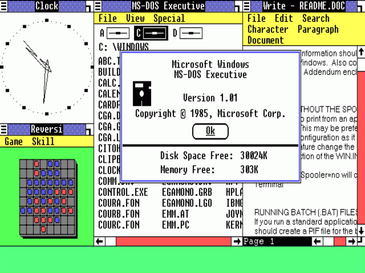
I wasn’t originally a fan of the hamburger menu icon (it’s not self-explanatory, you have to know what it means), but there was already precedence in Windows 1.0 for the so-called system menu for each application: https://upload.wikimedia.org/wikipedia/en/4/4e/Windows1.0.pn...
> I wasn’t originally a fan of the hamburger menu icon (it’s not self-explanatory
I definitely agree. I just think that it's just been so common in GUIs for long enough to be one of the few that's probably safe to just assume will be understood. Sort of like the two vertical bars for 'pause' on a media player.
I hate that it’s being used on the desktop, where there is plenty of space, resulting in a smaller hit target and often an additional click for items that would normally be top-level. Even on mobile, there would often be sufficient space to show a word like “Menu”.
> Or the word "Search" next to a text box with a magnifying glass in it
And you’d be amazed at the number of nontechnical people who struggle with that.
This is why websites designed for people of varying technical abilities, for example holiday booking sites, have text inside the search box describing what it’s used for.
For example in this picture of EBay, there is text that says “Search for anything”
> There is a spectrum from widely-understood symbols that don't need labels
Widely understood by who? People writing the software? Or people actually using the software? ;)
Software engineers sometimes forget that most people don’t use computers nor websites for fun and thus don’t want to learn what a bunch of pictograms mean.
Frankly, I don’t want to memorise icons either and I do use computers for fun. So there has better be some text labels available for when I’m old, eyesight going, and less comfortable with technology than I currently am.
Text is in a sense universal. At least within a particular language. It is not tied to a particular app or operating system. You can interpret it using the same mechanism that you use to interpret a book, the label of a bottle of wine, or the name on a gravestone.
How and why would I become an advanced user of a program I can't figure out how to use because none of the buttons have labels?
Pixelmator Pro shows you the names of the tool buttons, once, when you first launch the app. They disappear the moment you click a button. Nice. a whole 10 seconds to memorize all two dozen of them.
And they chose not to use the system tooltip on hover, so I have to wait for some humungous pictorial tooltip to load in when all I want to know is the goddamn hotkey.
How does that matter for the point? You can make it a setting for the user or just always show both. I never said that programs should exclusively use icons.
The initial claim was that text is strictly superior to icons, which means that icons have not a single thing they’re better at then text. That’s just plainly false.
That’s rarely the case, in my experience, especially when there are a dozen monochrome icons in a row. They just aren’t distinct or memorable enough. You learn their position after a while, but confirming the correct item by their pictogram remains slower than just reading a word or two, because the words are universal, whereas the pictograms are typically specific to the application.
Good luck learning keyboard shortcuts for every feature of a CAD tool. I understand Boolean modifiers from symbols faster than I can read them, but I’m not going to memorize every shortcut for stuff like that.
I think the commenter you're replying to might have been referring to pictograms like many Chinese characters, not icons that you have to figure out. Or maybe not
A handful of Chinese characters are pictograms. As far as I recall, it is by far the smallest class of characters, and all of them, including the ones that started as pictograms, are treated by modern readers as phonetic indicators.
I glance at a word and instantly (other than eye-to-brain processing delay) know what the word is. Icons that aren't the absolute most common take longer for me to parse.
As long as some people are different that you, it’s still not strictly superior though. If some people are better with icons, you still have to do a tradeoff.



:max_bytes(150000):strip_icc()/eBay-5acb902a18ba0100375b9808.jpg)